Designing for 100M LLM Users: Rebuilding Gemini Chat's Frontend from the Outside In
- agentic-ui
- llm
- frontend
- streaming
- state-management
- system-design
I've worked across M365 chat, Slackbot, and Agentforce chat experiences, enough to know that designing an agentic user experience for a product with a large user base is not easy. And yes, even with AI doing most of the heavy lifting in software engineering, it becomes more important, not less, to look at what sits just behind the frontend interface: state, chat streaming, failure handling, history, and agent memory.
In this blog we'll be looking at the current Gemini chat experience as of 28th July 2026, and working backwards from it to the system design behind its agentic UI.
There are some design constraints to be wary of:
- Scale. When we are designing an agentic UI, we are expecting a huge number of users, each user carrying multiple sessions. If those sessions are all fetched and rendered at once, they completely burden the session sidebar and the experience degrades.
- Multi device. Gemini chat is a single UI associated with an account, not with a browser. The same account can be open on another device, or in another tab, at the same time — so we cannot treat anything stored in the browser as authoritative, and we cannot rely on the browser cache as the source of truth.
- Cold start. Most sessions will begin with a cold start, which means greater latency on the first user message to the LLM — we'll talk about this further down.
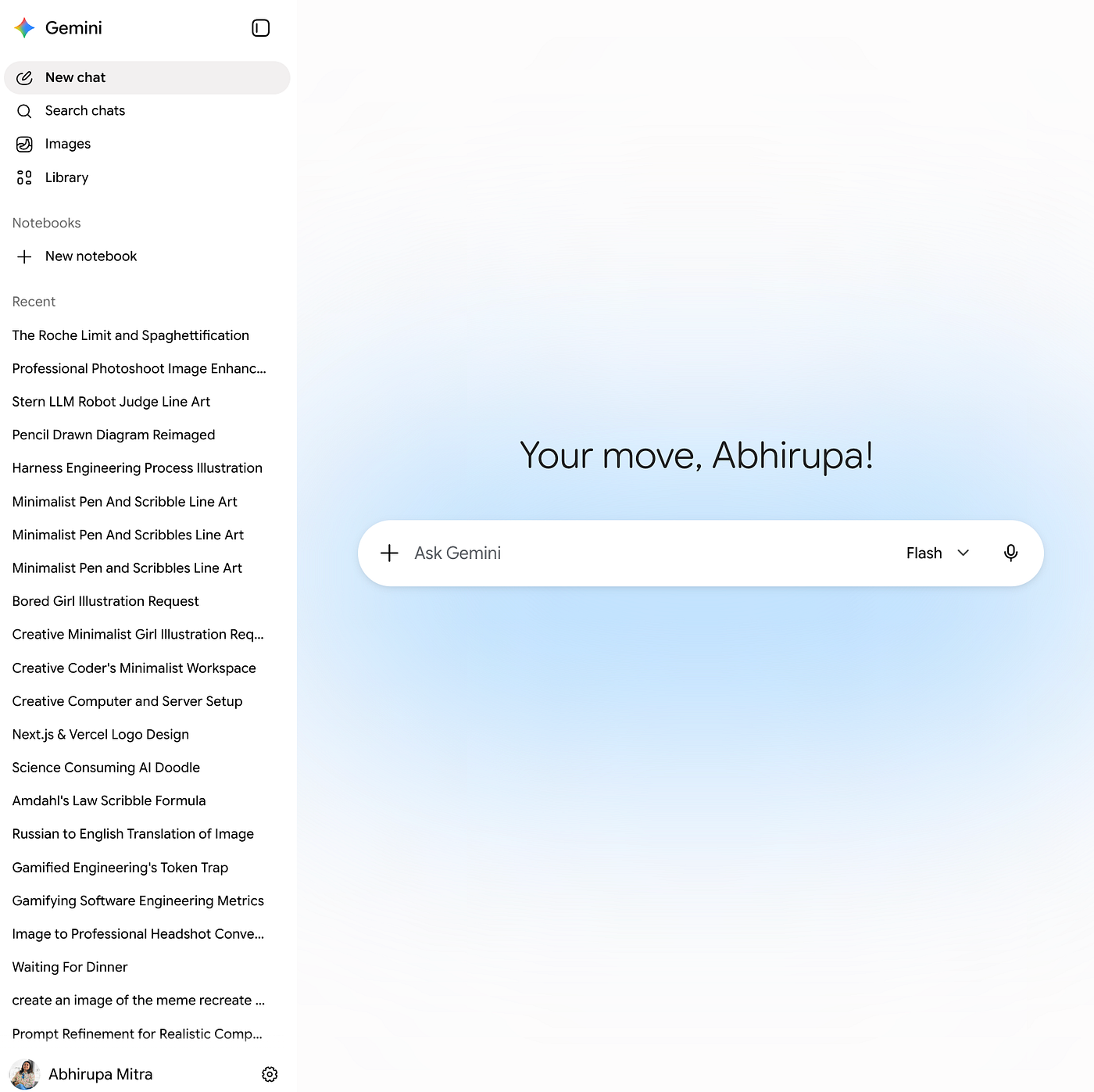
Let's break our thinking down to these major areas based on the screenshot above.
The screen holds a myriad of components. The first is the chat experience itself, which would involve the following:
- Handling, storing, and processing multiple back and forth exchanges between the user and the LLM
- Managing the streaming text that comes with them. Text generated by an LLM arrives in a streaming format, which means we receive partial text first and committed text after. The committed text is final and settled. The partial text is still arriving.
- Queueing up of user queries
- Handling attachments, links and unfurling them — and the error states
To the left are controls that redirect you to a new chat, a search function, and image creation.
Towards the bottom sits a list of agent sessions. Each session is named from a summary of the chat, which is itself an LLM generated name. At the bottom there is a settings entry point, which holds MCP app connections, memories, and general guidelines the user can tweak to shape how the LLM responds.
Given this, we can break the experience into layers:
- The first layer is what you see on the frontend: agent text streaming states, agent sessions, and failure handling.
- The second layer sits beneath it and deals with building context, creating memory, and MCP connections.
- The third layer involves scenarios that require out-of-the-box handling such as deep research and long running threads, rendering Generative-UI Components — and the likes.
We'll talk about #2 and #3 in separate blogs and focus solely on the messaging experience for this one (#1).
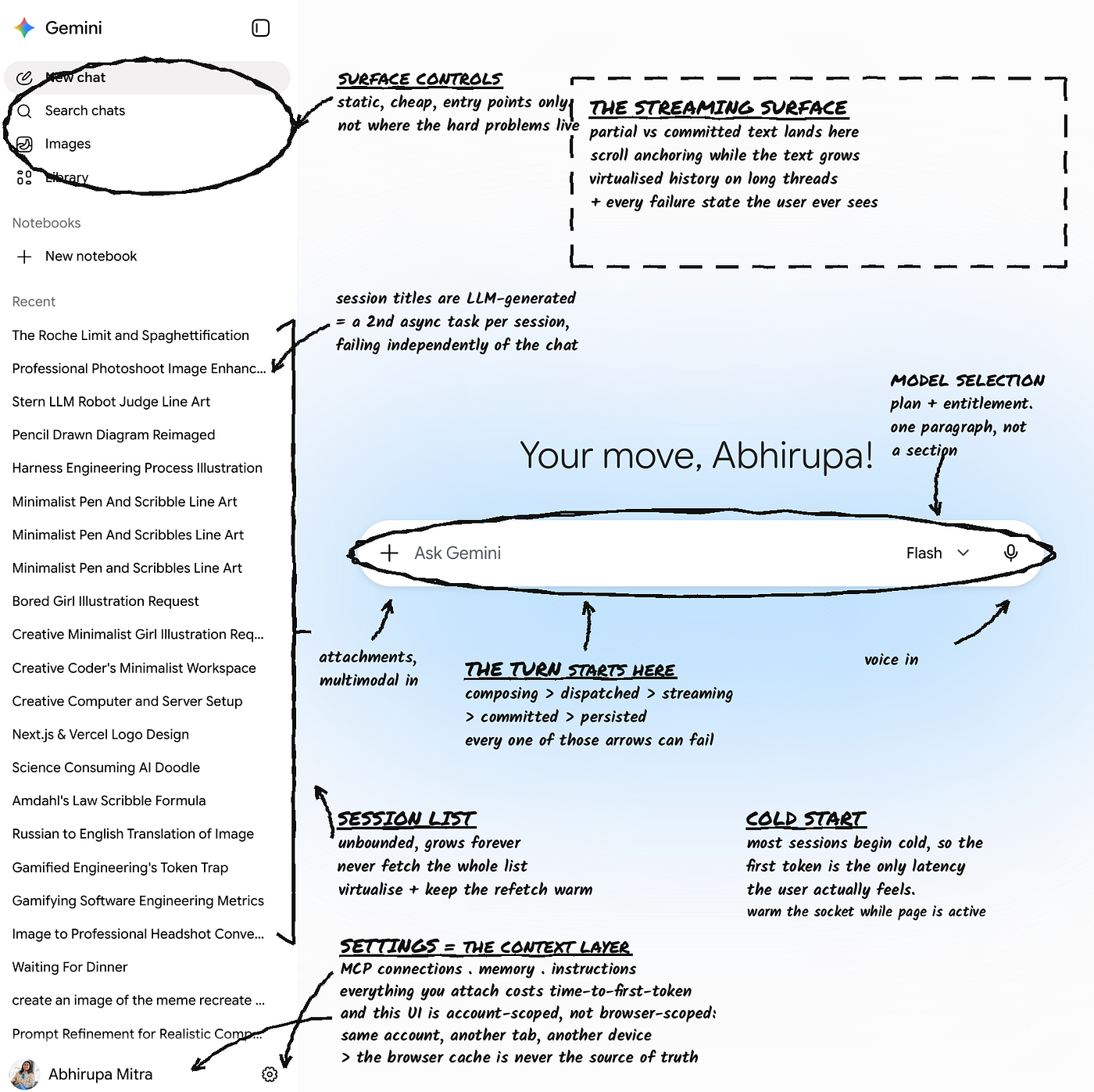
The agentic messaging experience
Design choices to make the LLM DM performant and the user experience consistent.
A few points to note before we head to a deep analysis:
- Transport. We'd prefer to use Server-Sent Events — a one-way channel that streams updates from server to browser over a single HTTP connection. for all non text heavy conversations, and WebSocket for all images and voice conversations that require a two way open path between client and server.
- Input modality. Besides text, we have audio inputs or video feeds. As soon as we get an audio input, we live transcribe it and show the text flowing through the composer section. It's best to use the native transcription tool if the system has one, instead of making a separate call to a separate AI or LLM to transcribe it.
- Handling an unstable connection. We update the UI optimistically and dispatch, and the dispatch failing is how we learn there's no connection.
Let's bring up questions around designing and structuring the entire DM experience and understand the reasoning behind each design solution.
How do we best handle multiple tabs open of the same session?
The goal here is to avoid getting into this question: "Which tab has the most current context?"
We have two states:
- UI state.
isMenuOpen,isDataAttached,isComposerDisabled, etc — local to the tab, never shared. - Conversation state.
messages,isGenerating,history,draftMessage,memory.
Each tab subscribes to the conversation state.
We are looking at surfaces which are prone to collaboration, which means that in our situation this is a multi-tab scenario. In this scenario, there is a chance that a person will be typing one query at one end — and if we don't handle sync across tabs we could end up sending duplicate queries from all tabs.
So in that case, we would go ahead with something that is called a soft editing lock. If two tabs are editing simultaneously, we don't hard lock, but we show a message which says that the user is currently editing this draft.
We are also going to support live streaming, which means that since every tab is subscribing to the same conversation, any streaming response is going to be simultaneously streamed into every tab. This ensures there is a single generation, and all the tabs are in the same state at all times.
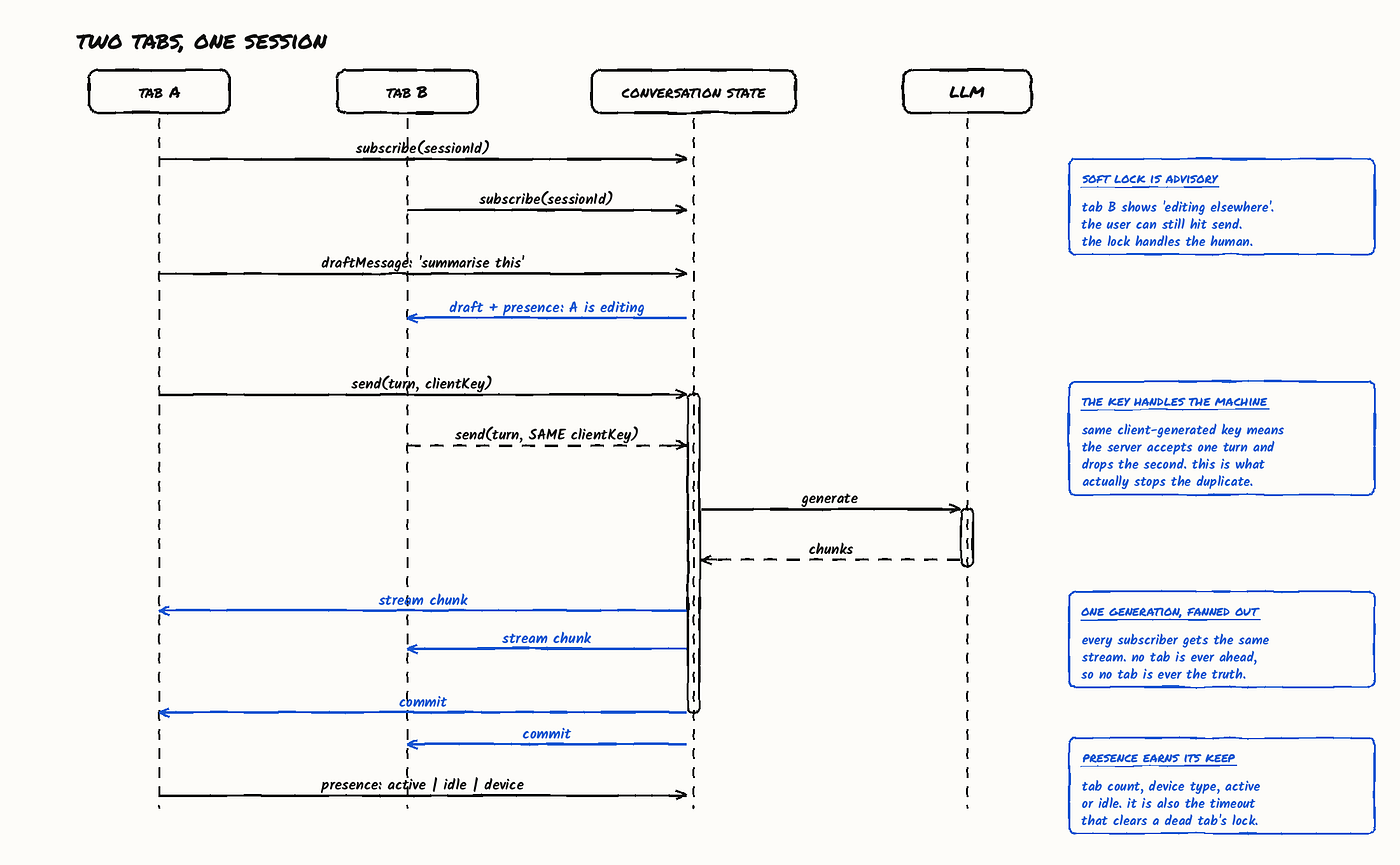
There's also a useful thing we could add on top of this — we could keep track of how many tabs are open, how many kinds of devices, like desktop, laptop and mobile, and what the state of each tab is, whether a tab is active or idle. This becomes useful if we need to use that data later.
How do you reduce TTFT and make the user experience smoother and seamless?
TTFT (Time To First Token) — the latency from sending a request to an LLM until the first token of its response arrives, the metric that dominates perceived responsiveness in streaming UIs.
Once we have typed out a message and pressed enter, we show optimistic updates — that is, we immediately show the UI update with the user query.
And while we are waiting for the LLM to respond, we are going to show a processing or progress loading text. This could be a set of fixed strings that is handled and maintained on the frontend with a little bit of animation, or a server sent data which shows which internal workflow (summarization, mathematical analysis, image generation etc) the LLM is calling.
Designing for the best user experience means minimum perceived latency. Here's how we can tweak our UI to react differently with increasing time between user query and first token reception:
- 0–5 sec: the output reads as immediate and fixed client-side strings are enough.
- 5–15 sec indicating a delay — past that, we start detecting which internal workflow the LLM is routing to (code generation, summary, document creation) and display a message naming it.
- Past the 15 to 20 second mark: check if the network connection exists, check if the SSE connection is live, and terminate if we've reached a timeout.
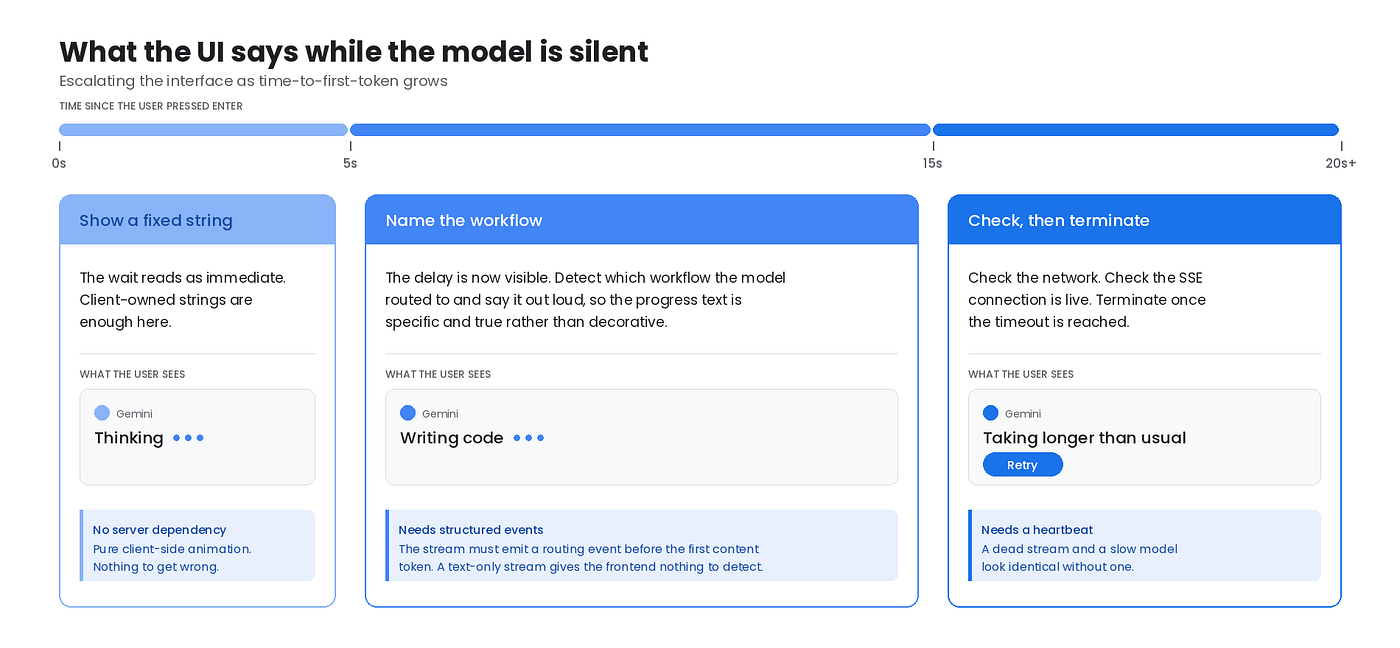
The progress strings don't fake specificity. They name the workflow the model is actually routing to.
This only works if the stream carries structured events and not just text. The server has to emit a routing or status event before the first content token. If the stream is text-only, the frontend has nothing to detect and the honest option is generic strings.
How does Gemini render streaming responses? What should we do if a response dies midstream?
Gemini tokens stream in chunks. We display them as is, as we receive those chunks.
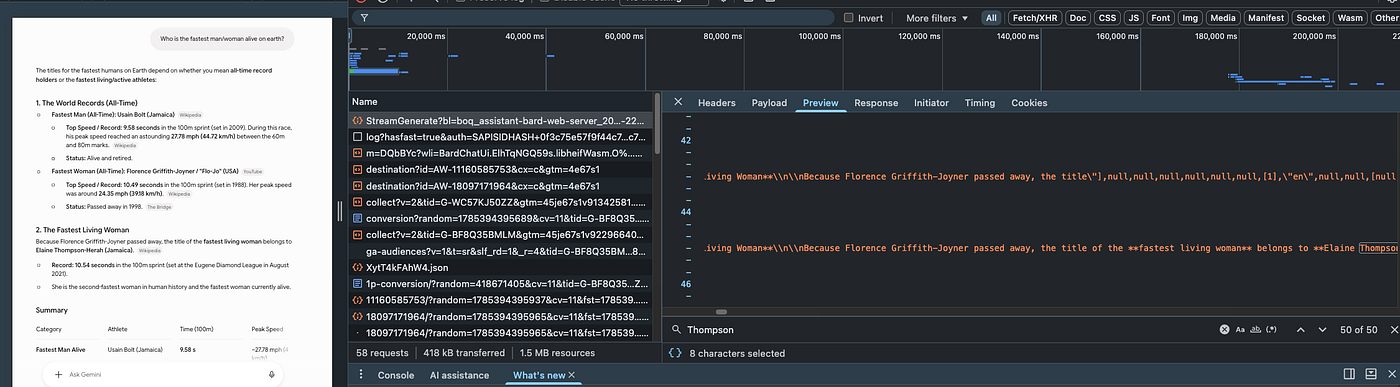
Streaming responses arrive as a sequence of incremental chunks rather than one complete payload. The frontend appends each chunk to the message as it comes in, which is what produces the token-by-token typing effect.
The important architectural point is that the rendered text is a running accumulation of an in-flight generation, not a committed result, and that distinction is what governs how you handle failure.
When a stream dies mid-response, can the frontend fetch what already streamed and fire a retry?
Not from the frontend alone. True resumption requires the server to have checkpointed the generation and to accept an offset to continue from, and most completion endpoints do not support this.
That leaves three practical options, ordered by cost:
- Restart. Discard the partial response, resend the turn, and generate again from scratch — leads to token wastage.
- Persist the partial and restart visibly. Explicitly mark the partial response as incomplete, and generate a fresh turn beneath it. This is honest about what happened, though visually awkward.
- True resume. Continue the original generation from where it stopped. This requires a server-side generation id plus a byte or token offset, so it is a backend contract rather than a frontend choice. Only available if the endpoint was built to support it.
What the frontend owns regardless of which option you pick:
Never persist a partial response as if it were committed. A stream that died is incomplete data, and treating it as a finished turn corrupts the conversation history and any downstream context built on it.
Frontend Architecture of Choice
What design I'd use to build the agentic UI interface.
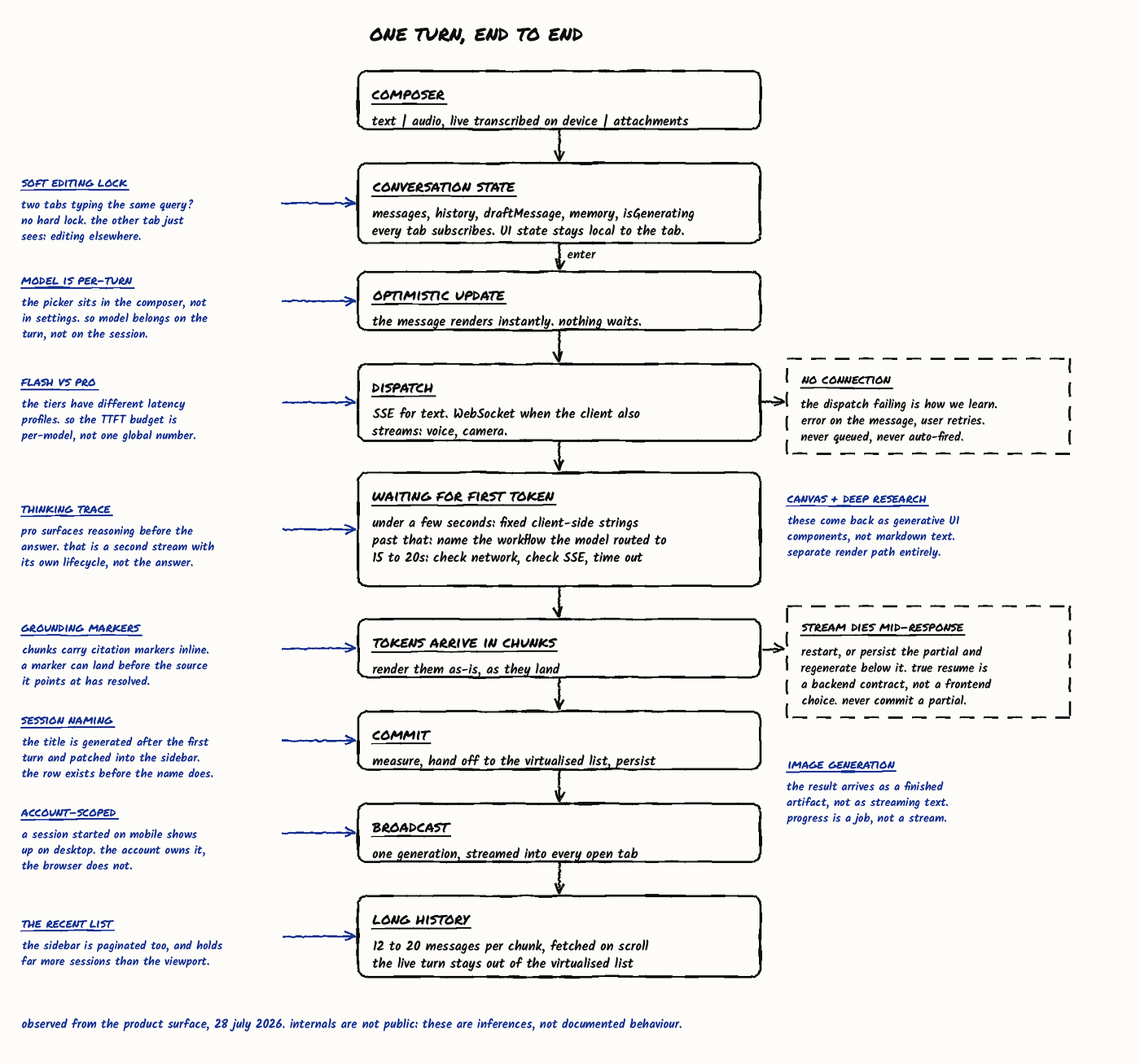
Summarizing all frontend design choices I'd make if I had to design a Gemini chat like solution, catering to millions of users:
- Three stores, not one. UI state owned by the tab, conversation state owned by the server, turn state owned by the in-flight generation. The client holds a replica, never an original. That dissolves "which tab is current."
- The turn is a statechart — composing → dispatched → streaming → committed, with failed and aborted as edges.
- Conversation state is an append-only log. Each open tab subscribes to this — multi-tab broadcast, chunked history, and future branching all fall out of it.
- Warm connection to reduce TTFT for the first query. We open the SSE connection when the composer takes focus, not when they press enter. Handshake and TLS setup then happen while the user is still typing, and the dispatch lands on a live connection.
- A coordination layer for tabs — presence, soft lock, and subscription to the same state.